
Initial Progress Report
Music Splitter and Transcriber
Ethan Regan, Jacob Avery, Jae Un Pae
March 31, 2024
Table of Contents
I) Summary of Project Idea
The goal of this project is to create a closed system that reads a .wav audio file of any musical composition and transcribes sheet music for each individual audio stem that is created.
Notably, our system should correctly split the song into stems that can each be further analyzed. We seek to achieve this goal by using a neural network model, MATLAB's audio and filtering libraries, and a pitch-correcting algorithm to appropriately decide which instrument is being played and correctly map each pitch to a note.
II) Tasks
1) Collect a library of music samples and start training the neural network learning algorithm to stem music
2) Create a baseline "proof of concept" with MATLAB's ability to differentiate pitches using filters
3) Create a MATLAB function that takes in the audio stems and outputs an array of notes after applying some pitch correction
4) Plot the notes as a function of time (if possible, detect BPM and split into bars)
III) Task Progress
Task 1)
Collect a library of music samples and start training the neural network learning algorithm to stem music
The search for a neural network model that could consistently get accurate results eventually led to the Multichannel-Unet-bss. This neural model can separate a song into four different parts (vocals, bass, drums/percussion, other) instead of specializing in removing a single instrument group from the song. This program would help decrease the complexity while still achieving acceptable results. This model is trained using the MUSDB18 dataset - a collection of 150 songs including the separated stems. By using this dataset, the program will learn from the examples and replicate the results in musical pieces outside the dataset. Investing in this program was met with several challenges, most of which included outdated code and errors with packages. We may have to search for a different neural network model if we are unable to get this model to function.
Task 2)
Create a baseline "proof of concept" with MATLAB's ability to differentiate pitches using filters
After splitting the music into stems, the system will interpret what notes are being played at every point in time. To test MATLAB's ability to approach this challenge, a test file consisting of 2 "different" instruments was created using GuitarPro that played two notes at the same time switching between notes. Shown below is the staff representation of the file, with each note played on the piano.
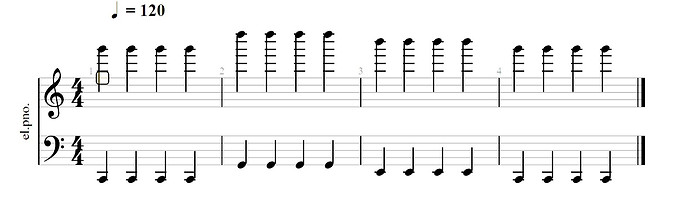
This file was then subjected to low-pass, band-pass, and high-pass filters to separates the file into three stems. A graph of the original signal and the produced stems is shown below. We used MATLAB's Fast Fourier Transform to plot the signals in the frequency domain as well.

As can be seen, the resolution on the high notes proved to be very visible, indicated by the three spikes in the band pass signal. Unfortunately, due to the nature of a piano, the lower notes in the sample produced many harmonics, which makes it difficult to identify the correct frequencies. Hopefully, with pitch correction and detecting the fundamental frequencies, this issue can be addressed. As it stands, we should be able to differentiate between notes at different times through a song by using a short window and applying the FFT to that window of time.

The image above shows the spectrogram of the three signals. This clearly defines where the filters are applied - for example, in the band pass spectrogram, the lower and higher frequencies of the signal are removed and only the middle frequencies between 400 and 5000 Hertz remain. By using a similar approach to the spectrogram, we can create an algorithm to identify pitches within a small window of time.
Task 3)
Create a MATLAB function that takes in the audio stems and outputs an array of notes after applying some pitch correction
Using the stems generated from the original audio, the system applies a pitch-detection algorithm to transcribe the pitches into notes on sheet music. This can be done in several ways; the method used here utilizes the pitch command in MATLAB which takes in the chosen method, window length, and overlap length to find the fundamental frequency.

The figure above shows the comparison between the different methods used to find the pitch of a saxophone solo playing an A major scale. The window length was set to 5% of the sampling frequency and the overlap length was set to 4.5%. In addition, a threshold value was added that would disregard values if the harmonic ratio of the fundamental frequency was lower than 0.3. For this particular sample, the PEF (Pitch Estimation Filter) and NCF (Normalized Correlation Function) give the cleanest outputs, yet both suffer from the problem of failing to determine which octave the note is correctly being played in, as seen by the sudden dip in the middle of the sample. A possible solution is to use instead the YIN algorithm which is based around the autocorrelation technique. However, we will use the PEF method for now, as it is sufficient to visualize the changing of pitches in this sample.

Although a pitch-correction algorithm like PSOLA can assist us in correctly matching each pitch to its corresponding note on the scale, for now we just applied a simple moving average filter to "smooth" out the data from the pitch detection.
Task 4)
Plot the notes as a function of time (if possible, detect BPM and split into bars)
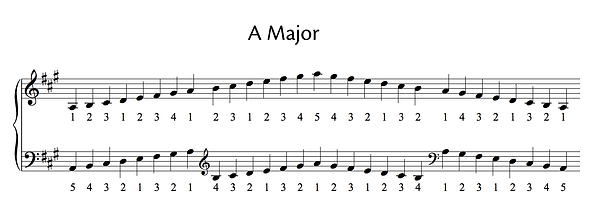
The goal is to produce something like the image above, using MATLAB or some other graphing program to take in an array of pitches and indexes and figure out the right position to place each note. We predict we will encounter obstacles in finding the right octave, dealing with polyphony (multiple notes at a time), distinguishing between a sustained and repeated note, and incorrect pitch tracking. However, with the audio stem splitter we can limit the algorithm to only focus on instruments that have a specific range and characteristics.
IV) Next Steps
We have outlined several milestones to complete over the weeks. These milestones ensure that the project remains feasible and stays on schedule.
Step 1) Finish training the music splitter and apply it inside of our project. Although this step is the most complicated, it must be finished as early as possible so we can test the functionality of the model and begin working on the music transcription. This step will be considered complete when we can input one of the provided songs from the musdb18 dataset into the neural mode and receive stems that compare to the expected output from the same database.
Step 2) Finish writing code for the transcriber tool and explore other techniques like YIN and PSOLA to provide more accurate results. This will be tricky to implement, but if we start out simple with scales and very basic melodies, then it will be easier to tackle more complicated inputs from the audio stem splitter.
V) What We Learned
During this project, we have used many toolsets in MATLAB. One of these tools is the Signal Analyzer, which none of had used before. This tool can perform several visualizing and analyzing functions to a signal. We specifically used this toolset to quickly perform different types of filters and analyze signals with a spectrogram. We plan to continue to learn more about the Signal Analyzer and other MATLAB toolsets as we dive into pitch-correction and other signal processing techniques to transcribe song stems into notes for sheet music.